Some applications don't like pasting metafiles from the clipboard, one of them is FoxIt PDF. We added bitmap export for the PostIt function and show you how to use it as a workaround for tapes and FoxIt PDF.
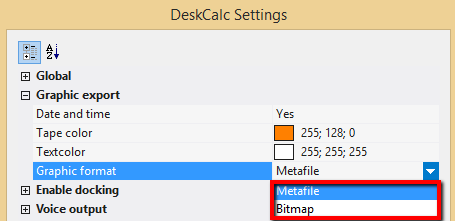
Choose "Bitmap" as graphic format:
Export to PDF

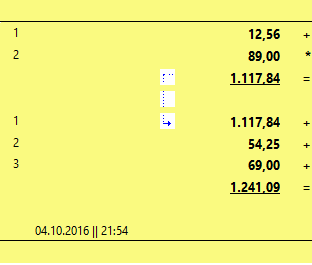
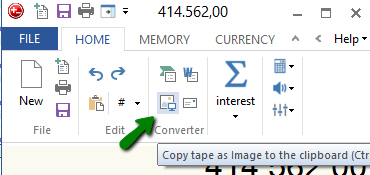
Copies the tape to the clipboard
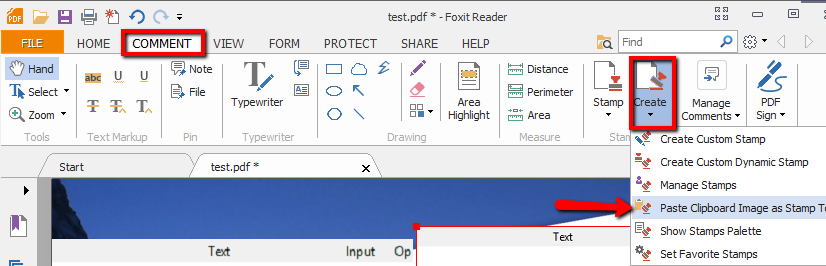
Create a image stamp from the clipboard:
Sticky Notes are probably the most common method used to add notes and comments to PDF documents. To add a Sticky Note, simply click at the "PostIt/Sticky notes icon". A sticky note with the calculation tape will be copied to the clipboard and you can paste it to your documents easily.
Version 7.1.0 now allows to choose the text and background-color of your sticky note.
We frequently release new minor versions with new features and bugfixes.
That implies, that we don't wait for major versions do add new features
-> major version don't necessary have a lot of new features at all.
But we happy to introduce v7 with some nice new features
- Office 2013 GUI
- Windows 8/8.1 support
- Better 64bit support
- Unit converter with temperature convertions
- Enhanced tape graphic export (PostIt) feature
- Minimzed DeskCalc window option
- PopUp window update
- Improved icons
- Some new keyboard shortcuts -> press Ctrl+F1 to check them out
- Select your own color for the input edit field, when DeskCalc is the active window - Bugfixes
DeskCalc /hide ...... starts DeskCalc hidden
DeskCalc /fs ...... starts Deskcalc full screen
DeskCalc kill ...... does terminate a running DeskCalc session
DeskCalc /neu ...... does open a new tape in a running DeskCalc session