Version 11 is out. The biggest change is one you notice in the first minute: what happens after you press Copy.
Paste the tape — and it stays a table
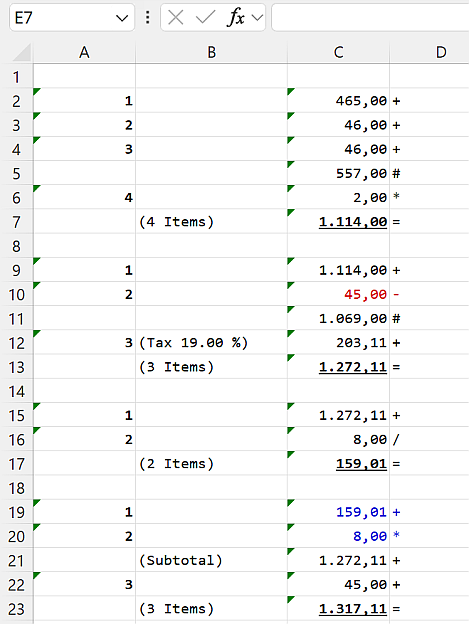
Until now, pasting a tape into Word or Excel gave you text you had to tidy up afterwards: columns realigned by hand, formatting redone, negative amounts turned black.
DeskCalc 11 puts the tape on the clipboard in four formats at once — HTML, an RTF table, plain text and an image. Word, Excel and WordPad each take the one they handle best. What arrives:
- real columns, with no manual alignment
- the font and the colours from your tape
- negative amounts still in red
- your position labels, where you put them
This is the route most people take out of DeskCalc: the calculation goes onto the document, so anyone can see later how a total came about.
Take figures from any window — with nothing else installed
Click & Calc reads numbers straight off the screen: select them, and they land in the tape. No retyping, no import step, and it does not care where the numbers come from — a PDF in the browser, a scanned invoice, your accounting software, a screenshot someone sent you.
In version 11 this works on its own. It previously required the Windows PowerToys to be installed alongside. In a firm where IT does not allow extra installations, that put the feature out of reach. It no longer does.
It also picks up the decimal separator from the scanned text, so both 1,234.56 and 1.234,56 arrive correctly. And you can put it on the quick access toolbar.
The tape as a picture — for PDF and anywhere else
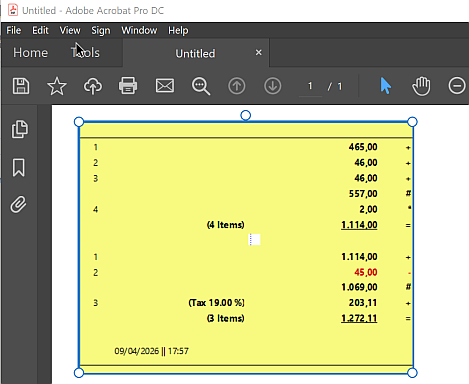
Sometimes you do not want a table but the tape exactly as it looks on screen. In the options you choose which one copying hands over, and the picture now carries the tape's own colours instead of plain black on white.
Pasting into Adobe PDF Pro and Creator is supported and works properly — the paste that used to come out oversized now arrives at the right size.
The Windows 11 look, in every dialog
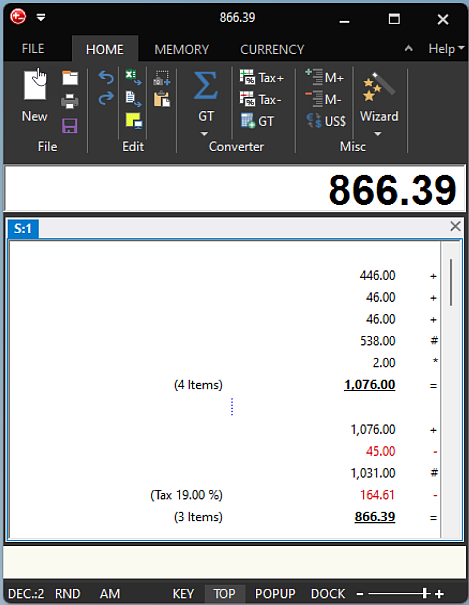
Every dialog now follows the theme you chose, light or dark. The dark themes were reworked where they were still patchy — the status bar, the FILE menu, the options button. On Windows 11 the title bar is dark and the corners are rounded.
Every total, without switching tabs
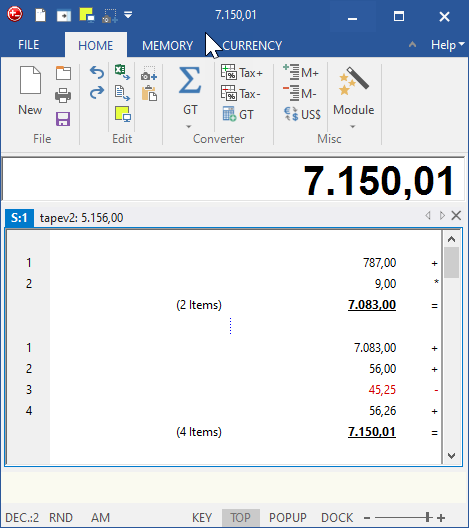
Each tape now shows its result in its own tab header. With several tapes open — one per client, one per account — you read all the totals at a glance instead of clicking through them.
New: The Excel export now carries formulas instead of formatted text only - you can keep calculating with the tape in Excel
New: Two tapes side by side - pin one of them and compare, or take a calculation over into the active tape
A jump list in the taskbar
Right-click the taskbar icon for a new tape, Click & Calc, or Copy as image — and for the tapes you had open most recently.
Spanish, French and Italian
Spanish, French and Italian have been added or brought up to date.
Also fixed
ENTER and ESCAPE now behave correctly when you finish editing a text on the tape.
About your licence
Version 11 needs its own licence key. Your existing key stays valid — permanently, for every 10.x version. Nothing has been switched off, and version 10 keeps working exactly as it did.
If you own an earlier version — 6, 7, 8, 9 or 10 — you get version 11 at 30% off, with no deadline. That discount is part of your licence and applies to every future major version: what you bought does not lose its value.
Version 11 also runs 31 days with the full feature set, so you can try it before you decide. If you bought only recently, just write to us — you will get the upgrade free.
Prefer to stay on version 10? That is fine, and the last release is still available: DeskCalc 10.1.4.