Financial wizard functions
DeskCalc’s financial-calculations menu bundles thirteen specialist tools — from interest and loan schedules to pricing, costing and company valuation. This page explains what every function does and what belongs in each input field.
Each function opens as its own window. You fill in the input form and press Calculate to
get a result or a full schedule, which you can also Print. Amounts are entered in your
local number format (for example
45.644,00);
click or tab into a field and the whole value is selected, so typing simply replaces it. The tools fall
into three groups:
Loans & interest
Interest calculation
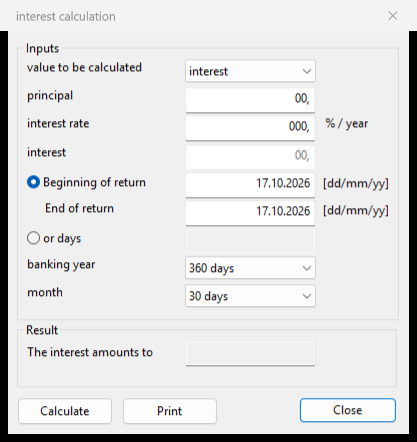
A simple-interest calculator. It links the four quantities — principal, interest rate, interest amount and time — so that you enter the three you know and it solves for the fourth. The value to be calculated drop-down chooses which field is the unknown.
| Value to be calculated | Picks which quantity to solve for — interest, principal, rate or time. Leave that field empty. |
| Principal | The capital the interest is calculated on. |
| Interest rate (% / year) | The annual nominal interest rate, in percent. |
| Interest | The interest amount in currency. |
| Beginning / End of return, or days | The term — either as two dates, or directly as a number of days. |
| Banking year / Month | The day-count basis (360 or 365 days per year; 30 or actual days per month). |
Output: the result line (“The interest amounts to …”) and the field you marked as unknown.
Amortization schedule (loan)
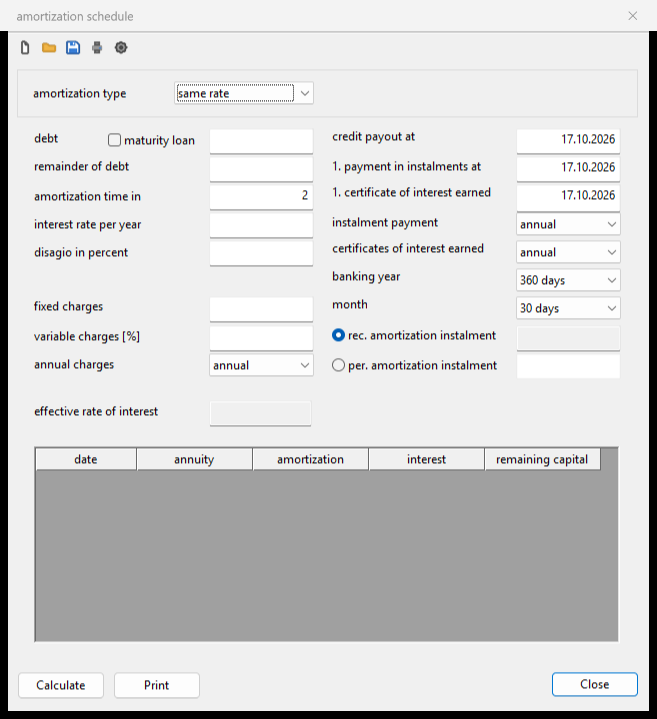
A loan repayment planner. From the loan amount, interest rate and term it builds a full schedule — one row per payment with annuity, repayment portion, interest and remaining capital. Repay in equal instalments (“same rate”) or as an annuity (constant total payment); it also accounts for a disagio and for fixed and variable charges, and reports the effective rate of interest.
| Amortization type | Same rate keeps the repayment portion constant; annuities keeps the total payment constant. |
| Debt · Maturity loan · Remainder of debt | Nominal loan amount; tick maturity loan for a bullet loan; any residual still owed at the end. |
| Amortization time · Interest rate per year | The term (unit selects months/years) and the annual nominal rate in percent. |
| Disagio in percent | A discount withheld at pay-out — it lowers the amount received and raises the effective rate. |
| Fixed / variable charges · Annual charges | One-off fees, percentage fees, and how often charges recur. |
| Three dates | Credit pay-out, first instalment, first interest statement. |
| Instalment / interest intervals · Banking year / Month | How often you pay and interest is settled, plus the day-count basis. |
| Rec. / per. amortization instalment | Let the module recommend the instalment, or enter your own fixed repayment per period. |
Output: the effective rate of interest and the full amortization schedule (date, annuity, amortization, interest, remaining capital). It recalculates live, so it stays empty until debt, rate and term are valid.
Disagio apportionment
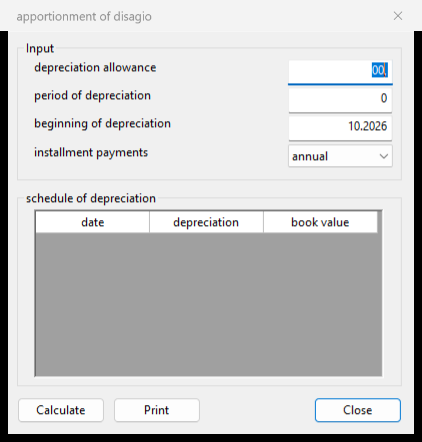
What is a disagio? A disagio (or damnum, discount) is the gap between a loan’s nominal amount and the lower amount actually paid out — economically it is pre-paid interest. In accounting it is capitalised and written off over the term of the loan. This module produces that write-off schedule.
| Depreciation allowance | The total disagio amount to be written off. |
| Period of depreciation | Over how many periods it is spread — normally the loan term. |
| Beginning of depreciation | The date the write-off starts (usually the pay-out date). |
| Installment payments | The write-off interval — annual, semi-annual, quarterly or monthly. |
Output: a schedule of depreciation — each period’s date, the amount written off and the remaining book value, summing to the full disagio by the end of the term.
Pricing & costing
Trade calculator (Handelsrechner)
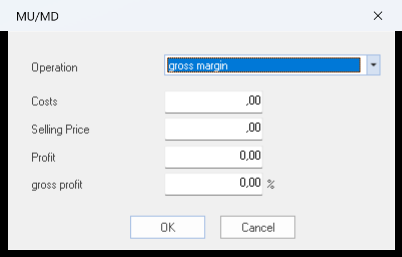
A margin calculator that relates cost price, selling price, margin and mark-up. Choose a mode from the drop-down to tell it which value you want, enter the two figures you know, and it fills in the rest. Available modes include:
| Gross margin | From cost and selling price, the trade margin. |
| Additional mark-on | From cost and selling price, the mark-up on cost. |
| Cost (from selling price, margin) | Back-calculate the cost price for a target margin. |
| Cost (from selling price, extra charge) | Back-calculate the cost price for a given mark-up. |
| Selling price (from cost, margin) | The price needed to reach a target margin. |
| Selling price (from cost, earnings) | The price needed to reach a target profit per unit. |
Output: the two remaining figures (price, cost, margin or mark-up) are filled in for the selected mode.
Units converter (Einheiten)
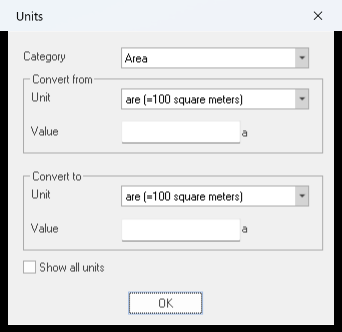
A quick converter between physical units of measurement. Pick a category and the source and target units, type a value, and the converted amount is shown. Useful for turning quantities on an invoice or order into the unit you need before dropping them onto the tape.
Costing (Kalkulation)
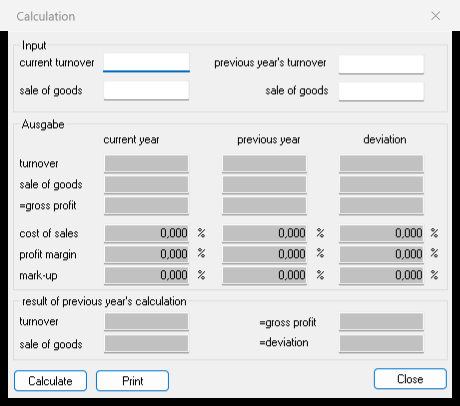
Compares the trade margin of the current year against the previous year and shows the deviation. You enter turnover and the cost of goods sold for each year; the tool derives the gross profit, the profit margin and the mark-up, and highlights how they changed.
| Current turnover · Sale of goods | This year’s revenue and the cost of the goods sold. |
| Previous year’s turnover · Sale of goods | The same two figures for the prior year, for comparison. |
Output: gross profit, profit margin and mark-up for each year, plus the deviation between the two years.
Cash discount (Skonto)
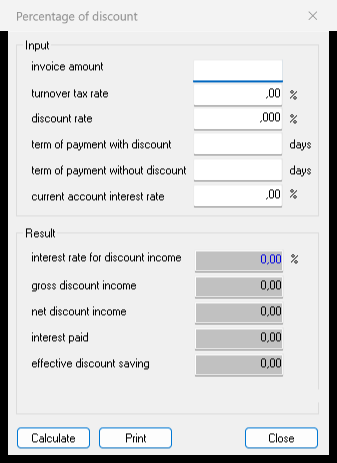
Works out whether taking an early-payment cash discount is worthwhile. From the discount terms it computes the implied annual interest rate of the discount and compares it with your current-account rate, so you can see if paying early (possibly on credit) actually saves money.
| Invoice amount · Turnover tax rate | The gross invoice and its VAT rate. |
| Discount rate | The cash-discount percentage offered for early payment. |
| Term of payment with / without discount | The discount deadline and the normal due date, both in days. |
| Current account interest rate | Your overdraft/credit rate, to compare the discount against. |
Output: the interest rate implied by the discount, the gross and net discount income, interest paid if you borrow to pay early, and the effective saving.
Analysis & valuation
Product profitability
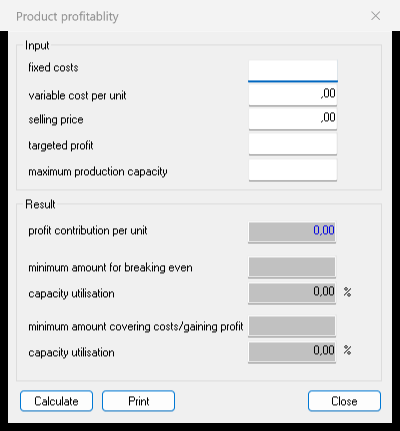
A contribution-margin / break-even analysis for a single product. From fixed and variable costs and the selling price it derives the contribution per unit and the sales volumes needed to break even and to reach a target profit.
| Fixed costs | Costs that do not change with the number of units. |
| Variable cost per unit | The cost that is incurred for each unit produced. |
| Selling price | The price per unit. |
| Targeted profit | The profit you want the product to earn. |
Output: profit contribution per unit, the quantity for breaking even, the quantity for reaching the target profit, and the resulting capacity utilisation.
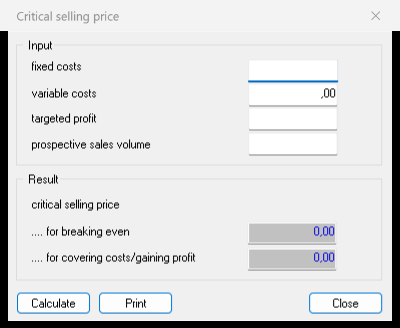
Critical selling price
The reverse question: given an expected sales volume, what is the lowest price at which the product still breaks even (or reaches a target profit)?
| Fixed costs · Variable costs | Total fixed costs and the variable cost base. |
| Targeted profit | An optional profit to build into the price. |
| Prospective sales volume | The quantity you expect to sell. |
Output: the critical selling price — the minimum price for breaking even and the price for covering costs and earning the target profit.
Profit improvement potential
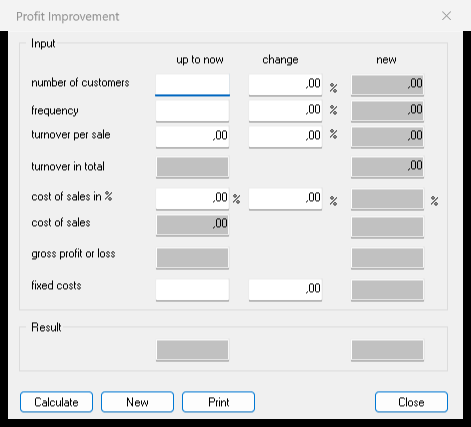
A what-if model for a sales business. From the number of customers, their buying frequency and the average sale it builds total turnover, cost of sales and gross profit, and lets you see the effect of changing any driver — up to now vs. new, with the change between them.
| Number of customers · Frequency · Turnover per sale | The three drivers of total turnover. |
| Cost of sales in % | The cost of goods as a share of turnover. |
| Fixed costs | Costs independent of turnover. |
Output: turnover in total, cost of sales and gross profit or loss — shown side by side as “up to now”, “change” and “new”.
Personnel costs per hour
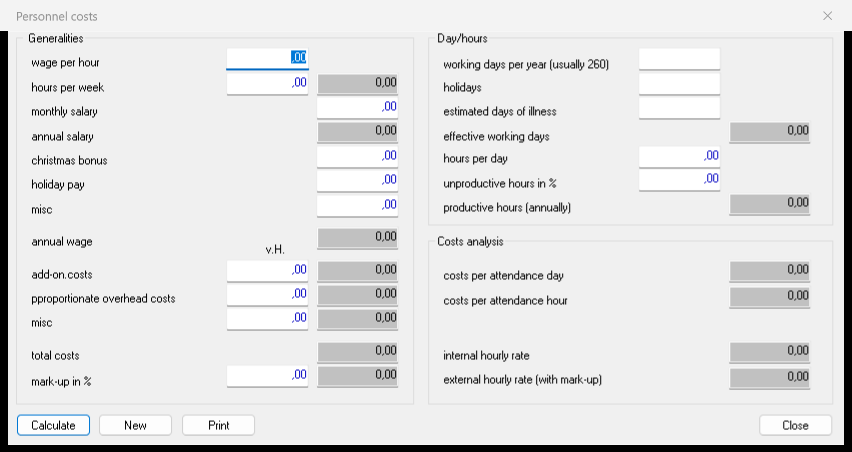
Works out the true cost of an hour (and a day) of an employee’s work — the number you need for quoting and for cost accounting. It builds up the full annual wage, adds on-costs and overheads, and divides by the genuinely productive hours in a year.
| Wage / salary | Wage per hour and hours per week, or monthly / annual salary. |
| Christmas bonus · Holiday pay · Misc | Additional annual payments that make up the total annual wage. |
| Add-on costs · Proportionate overhead costs · Mark-up % | Employer’s on-costs and a share of overheads, as amounts or a percentage. |
| Working days per year, holidays, days of illness | Used to derive the effective working days. |
| Hours per day · Unproductive hours in % | Turn working days into the productive hours actually billable. |
Output: total annual personnel cost and the resulting cost per productive day and per productive hour.
Company value — capitalised earnings (income method)
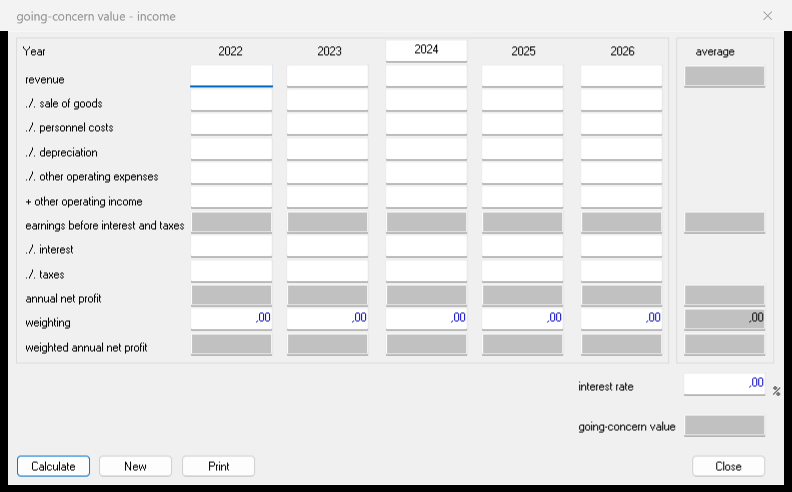
Estimates the going-concern value of a business from its earning power. You enter a profit-and-loss statement for several years; the tool computes each year’s net profit, forms a weighted average and capitalises it at a chosen interest rate.
| Per year: revenue, cost of goods, personnel costs, depreciation, other expenses / income | The profit-and-loss lines leading to earnings before interest and taxes (EBIT). |
| Interest · Taxes | Deducted from EBIT to give the annual net profit. |
| Weighting | How strongly each year counts in the average (recent years usually weigh more). |
| Interest rate | The capitalisation rate applied to the sustainable profit. |
Output: the weighted average annual net profit and the resulting going-concern (company) value.
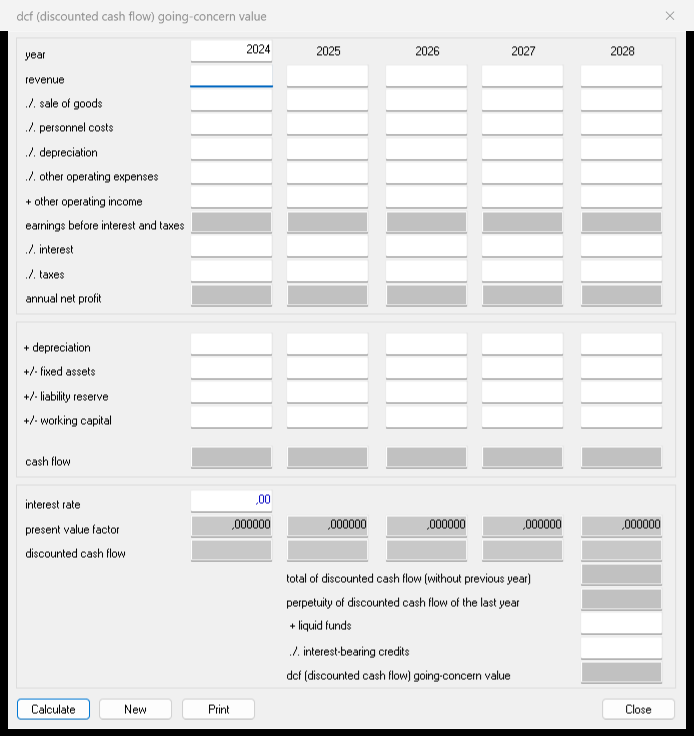
Company value — DCF (discounted cash flow)
The same valuation question answered with the discounted-cash-flow method. From the yearly profit it derives the free cash flow, then discounts each year to today with a present-value factor and adds the results.
| Per year: the profit-and-loss lines to annual net profit | As in the income method — revenue down to annual net profit. |
| + depreciation, +/- fixed assets, +/- liability reserve, +/- working capital | The adjustments that turn net profit into cash flow. |
| Interest rate | The discount rate used to build the present-value factor for each year. |
Output: the cash flow and present-value factor per year and the summed discounted cash flow — the DCF company value.
Questions about the finance tools?
Drop us a line — we usually reply within one business day.
Contact us