The adding machine, now an app
The display, the keys, the tape, Grand Total and the tax key — the whole desktop adding machine, running as software on your PC. Free to try, one-time licence, no subscription.
Windows desktop · free to try · no monthly fee
Everything the desk machine did — as an app
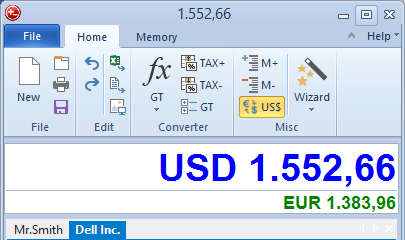
The whole machine, on your PC
The display, the 10-key layout, Grand Total, the memory keys, the markup and tax key — the same functions you reach for on a desktop adding machine, as a Windows app.
A tape that never runs out
Every entry lands on a running tape you can scroll and correct. No roll to change mid-total, no ribbon to fade — and nothing to re-key when one figure was wrong.
It remembers, it exports
Name a calculation, save it, reopen it tomorrow, or send the numbers straight to Excel or PDF. An app keeps what a paper machine threw in the bin.
What the hardware on your desk can’t do
Nothing to buy again
No paper rolls, no ink ribbons, no replacement unit when it finally jams. One download, and the running cost of the machine on your desk drops to zero.
Keys that click — if you want
DeskCalc can click on every keystroke, the way the machine did, so you still hear the entry land. Or run it silent. Your call, not the hardware’s.
Reads figures off the screen
Point Click&Calc at a number on an invoice or PDF and it types itself onto the tape — something no desktop adding machine on earth could ever do.
The machine still costs you every year
Paper, ribbons and the replacement unit add up quietly. The app costs once. Here is the same maths our ROI sheet uses — and where the rest of the switch is spelled out.
The adding machine app, answered
Is there a free adding machine app for Windows?
You can download DeskCalc and use the full adding machine before you buy — the 10-key, the tape, the tax and memory keys all work. See pricing for the one-time licence (no subscription).
What is a 10-key (ten-key) adding machine?
A 10-key is the number-pad layout accountants use for fast, blind data entry — the same keys and feel as a printing adding machine. DeskCalc gives you that 10-key on your own keyboard, with the figures landing on a tape as you go.
Can I use it without a mouse?
Yes. DeskCalc is built for keyboard-first use: type the figures and operators on the numeric pad exactly as you would on the machine. The mouse is optional, not required.
Will it replace my desktop adding machine?
That’s the idea. If you’re moving off a specific model, the switch guide shows every key and where it lands in DeskCalc. Prefer the paper-tape angle? See the calculator with a tape page.
Put the machine on your PC
Download DeskCalc, run a few figures on the 10-key, and watch them land on the tape. If it feels like the machine on your desk — only cheaper to keep — make the switch.
Download for Windows