The paper tape, without the paper
A desktop calculator with the tape right on screen — type like a 10-key adding machine, watch every line land on the strip, scroll back and fix anything, and keep the tape instead of binning it.
Windows desktop · one-time licence, no subscription
What a paper tape does — without the paper
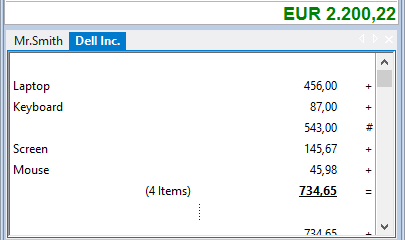
Every entry stays on the strip
The tape is right there on screen as you type. Scroll back through the whole calculation, see exactly what went in, and nothing scrolls away the moment you hit equals.
Fix any line — it recomputes
Click a line on the tape and change the number, the operator, or delete it. The running total and the grand total update straight away. No paper to re-run.
Keep the tape, don’t throw it out
Add a comment to any line, save the whole strip as a file, print it, or export it to Excel or PDF — something a paper roll could never do.
A 10-key adding machine, on your keyboard
A real 10-key, on your keyboard
Blind touch typing on the numeric pad, the keys laid out the way an accountant expects: a dedicated 10-key / ten-key adding machine, just without the hardware.
The key sound, if you want it
DeskCalc can click on every keystroke — the familiar adding-machine rhythm that tells you the entry landed. Turn it on, or off, whenever you like.
Grand Total, memory, tax key
The keys you actually use on a printing calculator are all here: Grand Total, the memory keys, the markup and tax key — same workflow, same muscle memory.
More than a paper roll ever gave you
The tape is just the start. DeskCalc keeps your calculations as living documents — annotate them, keep two running at once, and hand the numbers straight to your spreadsheet.
Calculator-with-a-tape, answered
Is there a calculator with a tape for Windows?
Yes — DeskCalc is a desktop calculator with a visible tape (the running strip) for Windows. It works like a printing adding machine, but the tape lives on screen instead of on paper, so you can edit it and save it.
Can I edit the tape after I’ve typed it?
Yes. Click any line on the strip to change the figure or the operator, or remove it entirely. Every total above and below recalculates — no re-keying the whole run.
Is it a free tape calculator?
You can download DeskCalc and try the full tape calculator before buying. See pricing for the one-time licence (no subscription).
Does it replace my printing adding machine?
That’s exactly what it’s for. If you’re switching from a specific model, the switch guide shows every key and where it lands in DeskCalc.
Try the tape on your own desk
Download DeskCalc, type a few figures, and scroll back through the strip. If it feels like your old adding machine — only editable, saveable and silent when you want it — keep it.
Download for Windows