Check the numbers yourself
Re-add the column by hand, on a tape you can see and edit, on a tool that never touches the cloud. A figure verified by the same system that produced it hasn’t been verified — this is the independent second pair of eyes.
Runs fully offline · no account · one-time licence
A check inside the same system isn’t a check
Separate the check from the source
If the same spreadsheet — or the same automation — both produces a figure and “checks” it, the same mistake sits in both. Re-adding the numbers in a separate tool is what makes the verification real.
You can see every line
The tape shows the whole run on screen. When your total and the stated total differ, you can scroll back and find which line causes it — not just that something is off.
Nothing leaves your PC
DeskCalc runs fully offline — no account, no cloud, no AI pipeline. The figures you’re auditing never leave the machine, which keeps client and government data where it belongs.
The verification workflow, on one screen
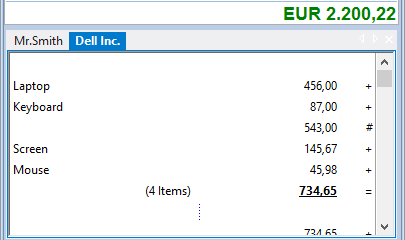
Re-key, or paste the column exactly
Type the figures blind on the 10-key, or paste a whole column straight from the source as text — exact, with no character-recognition guessing. Your entry, not the system’s.
Put theirs beside yours
Open two tapes side by side — the figures under review on one, your own re-add on the other — and read the difference for yourself, line by line.
Keep the record of the check
Add a comment to any line, then save the strip, print it, or export it to Excel or PDF — a dated record of what you checked and what you found, kept on your own machine.
Deliberately outside the pipeline
As more of the books are produced by automation, the value of a check is that it sits outside it. DeskCalc is a plain Windows desktop tool — offline, no account, deployable across a whole office or on a terminal server — so it stays the independent control, not one more thing in the chain that could carry the same error.
Independent checking, answered
Can I use DeskCalc to verify figures a spreadsheet or system produced?
Yes — that’s the point. You re-add the figures yourself on the tape, independently of the source, and compare your total against the stated one. Because the check is in a separate tool, the same error can’t hide in both.
Does it work fully offline?
Yes. DeskCalc runs entirely on your PC — no account, no cloud, no AI service. The numbers you’re checking never leave the machine, which matters for client confidentiality and government data.
Can I keep a record of the check?
Yes. Comment any line, then save the tape as a file, print it, or export it to Excel or PDF — a dated record of what you verified, stored wherever you keep your working papers.
Can I paste a column instead of re-typing it?
Yes. A column of numbers copied as text — from a PDF, a report or a spreadsheet — pastes straight onto the tape, exactly, with no character-recognition errors. You stay in control of what goes in.
Is it suitable for auditors, firms and government teams?
It’s built for exactly that: offline, deployable across an office or a terminal server, with volume and government licensing and one-time pricing — no subscription.
Can it read the figures aloud for a call-back check?
Yes. With speech output switched on, DeskCalc reads the tape aloud while you follow the source document — the classic “one reads, one checks” control, without a second person.
What if an AI assistant extracted the figures?
Then the check matters even more. With DeskCalc Verify, the assistant only hands over what it read; DeskCalc does the arithmetic and you confirm every line before the result is used.
Is it a one-time purchase?
Yes — one-time licence, no subscription, no renewal. You can download and try it first; see pricing for single and volume licences.
Put an independent check on your desk
Download DeskCalc, paste or re-key a column, and read the total for yourself — offline, on a tape you can see, edit and keep.
Download for Windows