• Home
  • Download
  • Buy
  • Blog
      • Back
      • Adding machine calculator - ROI
      • Video Tutorials
      • Documenation
  • Contact

Checkstrip - Font size

New Version 6.0.16 

1) Ever larger screen resolutions make it necessary to have larger text in the calculation tape.  
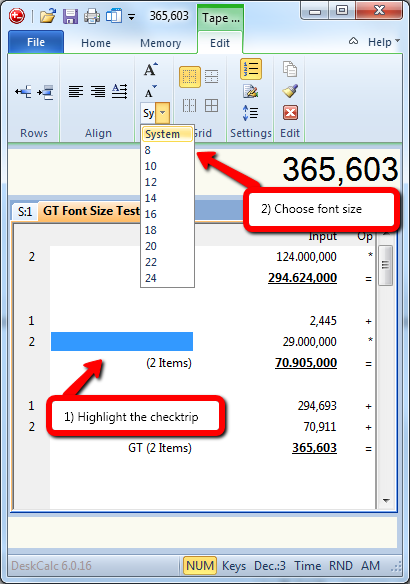
change font size 

2) Kroation language updated for DeskCalc 6


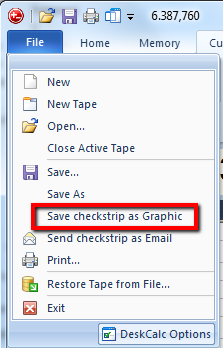
New checkstrip/tape export option: save to graphics file

At the present we have the following tape/checkstrip export options: Excel, Word, Clipboard, send as eMail and Postit. Because of some requests we added one more: save checkstrip as graphic-file.
Width resizing 

Version 6: Change Window Width DeskCalc

Previously DeskCalc was limited to vertical window size resizing, but version 6 finally allows you to change the width as well.

Width resizing 

New tape edit ribbon tab

In previous DeskCalc versions all kind of tape settings like:

 - line numbers
 - memorized text
 - align text
 - tape settings
 - add/remove lines

had been hidden in various setting dialogs. But if you click the tape now, all these
settings are available at the same time.

tape calculator settings 

Docking DeskCalc to screen borders

A nice new feature in Deskcalc 6 is the docking function. But what is docking:

What are appbars (application desktop toolbars)? An appbar (application desktop toolbar) is a window similar to the Quick Launch bar, the Language Bar or the Windows Taskbar. It is anchored/docked to an edge of the screen, and it typically provides the user with quick access to various things like program shortcuts, favorite files, folders or URLs, information such as the local weather or sports news, or commonly used programs such as a clock, stopwatch or your calculator. Appbars are allocated their own area on the screen and the system prevents other applications from using that area. 

Using this Windows functionality DeskCalc is always visible and doesn't use space occupied by other applications on the desktop.

Choose the screen border for docking:

Always on top calculator 

Enable docking:

Enable Calculator Docking 

  1. Fullscreen calculator mode
  2. Calculator keyboard shortcuts
  3. Keypad location - new touch screen mode
  4. Add your memory calculation to the tape/checkstrip

Subcategories

Entry

Page 6 of 13

  • 1
  • 2
  • 3
  • 4
  • 5
  • 6
  • 7
  • 8
  • 9
  • 10
© DeskCalc GbR 2001 - 2026
  • Documentation
Back to top