What changed, release by release
Every DeskCalc release since 2009, newest first — new features, improvements and fixes, the way we have shipped them: small, steady and often.
Version 11.3.1
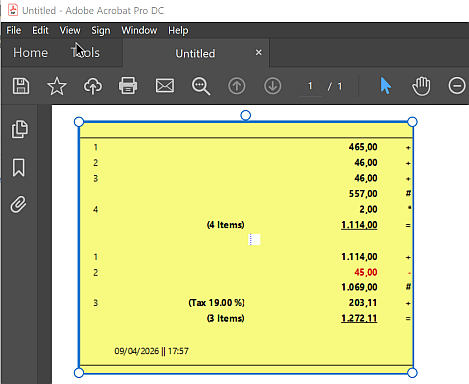
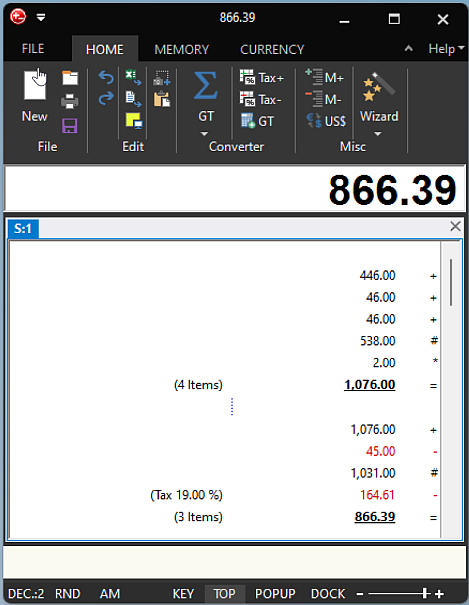
07.11.2026- NewDeskCalc Verify shows the document next to the check: if printed figures differ, a pinned tape on the left shows them as printed — wrong lines in red, figures that only follow from them in yellow. Both tapes scroll together. If everything matches, the check tape gets a green frame (red when figures differ).
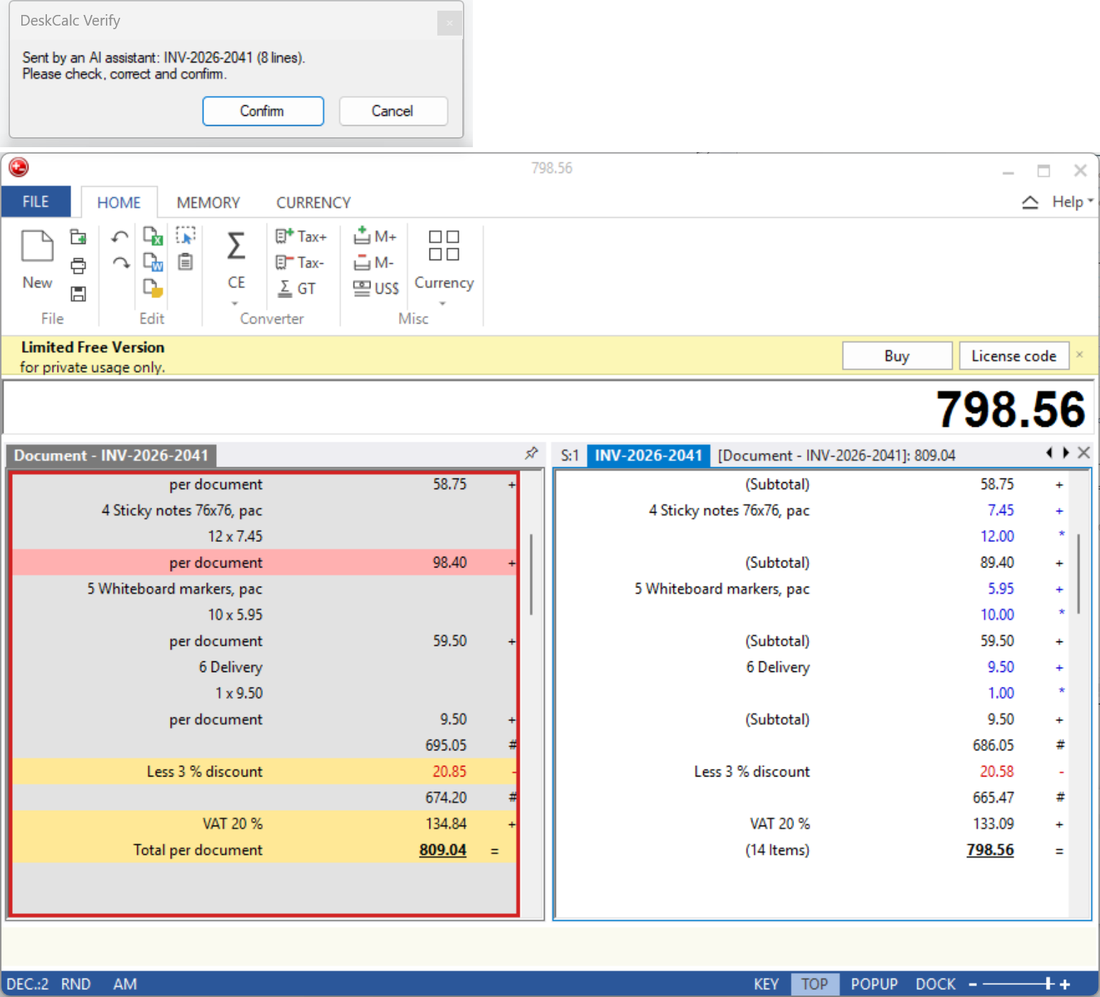
Left: the invoice as printed — one line total misprinted (red), discount, VAT and total follow from it (yellow). Right: DeskCalc’s calculation. How DeskCalc Verify works
Version 11.3.0
04.11.2026- NewDeskCalc Verify: an AI assistant (Claude Desktop, Codex) hands over the figures of an invoice, a stack of receipts, a bank statement or a table as a labelled tape. You check and correct every line in DeskCalc and press Confirm — only then does the AI get the result. It checks VAT, quantity × price, discounts, mixed VAT rates (one block per rate with a GT line), carry-overs and cross-footing, and can save an audit record as PDF.
- NewA VAT line can have its own rate (e.g. 10 % while 20 % is set); the rate is saved with the tape.
- NewThe Microsoft Store version can be started from the command line (
deskcalc). - NewDeskCalc reads the tape aloud when the speech option is on (accessibility).
- ChangePrintouts and PDF export of the registered version no longer carry a DeskCalc footer; the free version prints a small “deskcalc.com”.
- FixVAT included in an amount could be off in the last digits (120 incl. 20 % gave 99.999996 instead of 100.00).
- FixSilent setup (
/S, as used by winget) now replaces a running or previous DeskCalc reliably; “Apps & Features” shows version and publisher.
Version 11.2.5
23.10.2026- NewSave all open tapes together as a project file (.dcp) and restore them.
- NewOverlay window for passing values to a new tape.
- NewA column of numbers captured as text — e.g. Word or Excel cells, or other selected numbers — can be pasted straight into the tape: exact, with no recognition errors.
Version 11.2.4
18.10.2026- NewThe whole financial wizard — interest, loan, disagio and the business-analysis dialogs — now appears in English on English systems.
- FixMost finance and business dialogs now print a clean text report instead of a dialog snapshot — readable on high-resolution screens.
- FixThe loan calculator no longer crashes on incomplete input.
- FixThe “Memorized Text List” dialog and the startup dialog showed in German on English installs — now translated.
- NewAutomation command-line switches for scripts and other programs:
/resultfile <file>writes the current result to a text file (a return channel into a running DeskCalc);/showbrings DeskCalc to the front;/save [file]saves the current tape;/excelexports to Excel;/printprints silently.
Version 11.2.0
03.10.2026- NewThe Excel export now carries formulas instead of formatted text only — you can keep calculating with the tape in Excel.
- NewTwo tapes side by side — pin one and compare, or take a calculation over into the active tape.
- UpdateDouble-clicking a tape tab opens the naming dialog, the same as a right-click.
- FixThe mark for continuing with the last result is now transparent — it used to sit on a white box, which showed on the PostIt tape export.
Version 11.1.0
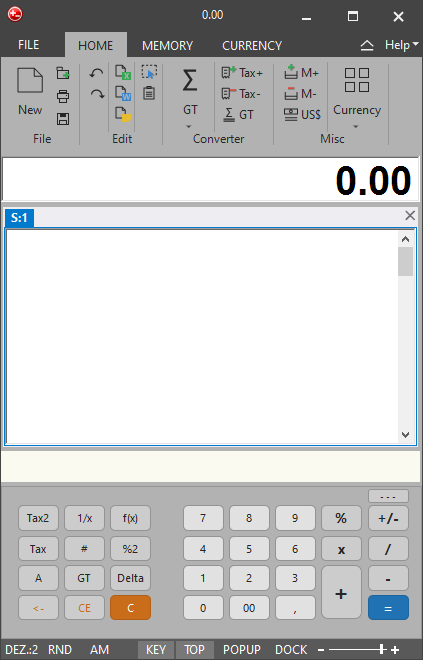
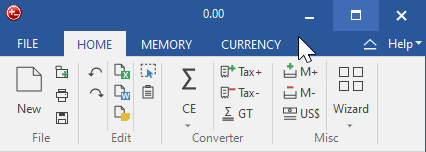
13.09.2026- NewRedrawn icon set for the ribbon — single colour, following the selected theme.
- NewColour only where it tells two commands apart: Excel green, Word blue, M+ green, M− red.
- NewRedesigned calculator keys — rounded, larger, in the colours of the theme.
- NewRight-hand keypad rearranged, now with Backspace, CE, C and +/−.
- NewRibbon and Quick Access toolbar alternate — collapse the ribbon and the toolbar appears.
- NewQuick Access toolbar below the ribbon, preset with New, Open, Save, New Tab, Excel, PostIt and Click & Calc.
- UpdateNew installations start with the “Light” theme.
- UpdateWin + Shift + A is the shortcut for Click & Calc.

Version 11.0.0
04.09.2026The big release. The headline change is what happens after you press Copy — read the full version 11 story.
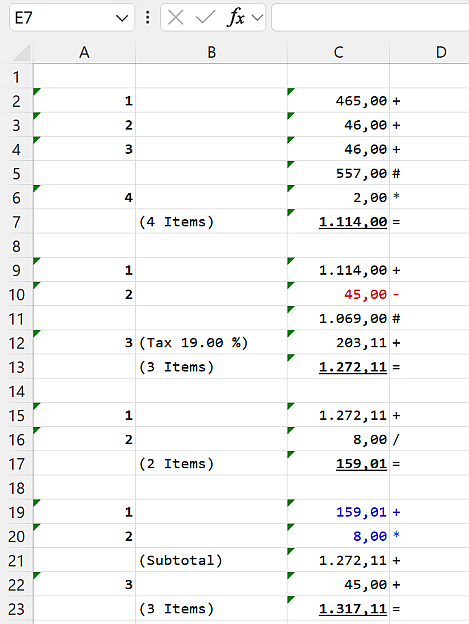
- NewPaste the tape and it stays a table: the clipboard now carries HTML, an RTF table, plain text and an image at once. Word, Excel and WordPad keep the real columns, the font and colours, the red negatives and your position labels.
- NewClick & Calc works on its own — no PowerToys required. It reads numbers from any window, picks up the decimal separator from the scanned text (both 1,234.56 and 1.234,56), and can sit on the Quick Access toolbar.
- NewThe tape as a picture now carries its own colours, and pasting into Adobe PDF Pro and Creator is supported — at the right size.
- UpdateEvery dialog follows the theme you chose, light or dark; the dark themes were reworked. On Windows 11 the title bar is dark and the corners are rounded.
- NewEach tape shows its result in its own tab header — read every total at a glance.
- NewA taskbar jump list: new tape, Click & Calc, Copy as image, and your most recent tapes.
- NewSpanish, French and Italian added or brought up to date.
- FixENTER and ESCAPE now behave correctly when you finish editing a text on the tape.
- •Version 11 needs its own licence key; existing keys stay valid for every 10.x version. Owners of version 6–10 get version 11 at 30% off, with no deadline, and a 31-day full-feature trial.
Version 10.1.2
12.08.2026- NewMore currencies — DeskCalc now supports 70 daily-updated currencies.
- NewBitcoin, gold and silver added to the currency converter.
Version 10.1.0
10.08.2026- UpdateDocking now supports desktop scaling other than 100% (UHD and larger).
Version 10.0.8
07.08.2026- UpdateWindows Store version upgrade.
Version 10.0.7
27.07.2026- FixSetup fix for Windows 11 — no more freezing.
Version 10.0.6
27.12.2025- FixCurrency calculator fix.
Version 10.0.5
29.05.2025- FixTime calculator fix.
- FixVirtual-key fix.
Version 10.0.3
12.10.2024- NewConstants: use fixed values and operators assigned to the X and Y keys to speed up calculations.
Version 10.0.0
10.08.2024- NewClick and Calc — capture numbers from any window straight onto the tape.
- NewPDF export for the entire tape, not just the visible area.
- NewQuick Access icons.
- NewDPI awareness — works well with 4K screens.
- NewBetter Windows 11 support.
- NewStart minimized from the command prompt.
- FixCurrency calculator rate updates.
- Fix“Invalid parameters” warning messages.
- UpdateImproved PDF export options.
- UpdateKeyboard calculator key.
Version 9.0.4
17.01.2021- FixAmortization schedule — function updated.
Version 9.0.3
10.01.2021- FixExcel export — local decimals and separators.
- FixKeyboard-shortcut translation texts.
Version 9.0.2
03.01.2021- FixTranslations.
- NewShortcut for docking on/off is Ctrl + D.
- NewSelect a voice from the installed voices for the speech output.
Version 9.0.1
24.05.2020- FixSupports calculations of up to 1000 operations.
Version 9.0.0
01.05.2020Version 9 continues the tradition of regular, continuous improvements rather than large annual updates — a few smaller, useful changes, with more added little by little.
- NewKeypad location (from the menu, and a touchscreen position).
- NewUse the arrow keys to reach previous elements in the tape, then press Enter to copy the value to the input field.
- UpdateThe date on the graphic export follows the system setting.
- NewShortcut to show/hide the keypad: Ctrl + Y and Ctrl + −.
- NewStatistics, shortcut L.
- NewHelp link to the website.
- UpdateOptimized print dialog, ribbon icons and tape drawing; more logging in the system info.
- FixSeveral minor fixes.
Version 8.3.8
19.10.2018- UpdateThe keyboard calculator key starts and shows DeskCalc, if the option is preselected.
Version 8.3.6
07.09.2018- NewLarger buttons for the full-screen mode.
- FixWizard functions fix for Windows 10.
- FixPacific currency-rates fix.
- FixOff-screen bugfix.
- FixDocking now works on multi-screen systems.
Version 8.3.3
24.03.2018- NewTwo new docking modes: top and bottom.
Version 8.3.2
06.02.2018- NewPrinter: POS printer mode.
Version 8.3.1
02.02.2018- NewPrinter: choose time or date; endless-paper mode; US date format MM/DD/YYYY; 12-hour time format.
- UpdateAM: zero decimals no longer disables AM mode.
- FixCurrency: Pacific-region converter source bugfix.
Version 8.2.2 – 8.2.8
12.01.2018- FixSeveral minor bugfixes.
Version 8.2.1
26.01.2017- NewAdd comments to the tape.
Version 8.1.10
12.01.2017- NewTime calculator re-enabled — Functions ▸ Time calculator.
Version 8.1.9
Jan 2017- FixVirtualDirectory fix for terminal servers.
Version 8.18
28.11.2016- FixCtrl + C — copy to clipboard bugfix.
Version 8.17
31.10.2016- FixUS/UK keyboards generated a division instead of a subtotal with #.
Version 8.16
26.10.2016- FixFloating-point / AM problem.
- FixCurrency download bugfix.
Version 8.13
25.08.2016- FixF3/F4 fix for the pocket-calculator and Windows-calculator modes.
Version 8.12
17.08.2016- NewKorean language.
- UpdatePocket/Windows calculator mode: a calculation can be continued after the result has been deleted.
- FixWindows 7/10 VirtualDirectory bugfix.
Version 8.10
17.05.2016- FixSubtotal bugfix.
Version 8.09
05.05.2016- NewM1 and M2 for the memory calculator — use two memory stacks in parallel.
Version 8.08
02.04.2016- NewSpanish language.
- UpdateShow the currency tab at all times.
Version 8.07
23.02.2016- NewEnable/disable warning and information messages.
Version 8.0.4
2016- •The main focus of version 8 was Windows 10 compatibility, usability and the user interface, with a few new functions added along the way.
Version 7.1.1
2015- NewPostIt: choose your background and font colour; show or hide the date and time; export as a metafile or a bitmap.
- NewShow or hide the currency sign in the total result.
Version 7.0.8
2014/2015We release minor versions with new features and fixes often, so a major version does not necessarily carry a lot at once. Version 7 brought:
- NewOffice 2013 interface.
- NewWindows 8 / 8.1 support and better 64-bit support.
- NewUnit converter with temperature conversions.
- NewEnhanced tape graphic export (PostIt).
- NewMinimized DeskCalc window option, updated popup window and improved icons.
- NewNew keyboard shortcuts — press Ctrl + F1 to see them; choose your own colour for the input field when DeskCalc is active.
- FixBugfixes.
Version 6.0.24
2013- UpdateHungarian language.
- UpdateImproved number read-back speed, with audio options for bookkeepers: activate speed, per-keystroke numbers, and a speech speed from 1 to 10.
Version 6.0.23
02.04.2013- FixSettings-save issues on some Windows 7 and Windows 8 installations.
- NewPrint the tape without showing the printer-settings dialog.
- NewThe printer settings remember the last selected printer — this enables the direct-print function.
Version 6.0.20
06.01.2013- NewSerbian language.
- Update“Send checkstrip by email” remembers the recipient address and subject.
- NewBank of Canada exchange rates as an alternative to the European Central Bank rates.
Version 6.0.17
03.08.2012- NewSmall calculator window for large system fonts or low desktop resolution.
- NewChoose the colour shown when DeskCalc loses the keyboard focus.
Version 6.0.16
22.07.2012- NewLarger text in the calculation tape, for ever-larger screen resolutions.
- UpdateCroatian language updated for DeskCalc 6.
Version 6.0.15
28.03.2012- FixTable row height was too small on some systems, so the text was not displayed properly.
Version 6.0.14
08.03.2012- NewSave the checkstrip as a bitmap file.
- NewSales tax with up to 4 decimal places.
- NewSlovenian language.
Version 6.0.10
12.12.2011- NewTape-edit ribbon tab — click the tape and all its settings (line numbers, memorized text, align text, tape settings, add/remove lines) are available at once, instead of hidden in separate dialogs.
- NewDock DeskCalc to a screen border (an appbar) — always visible, without taking space from other apps.
- NewFull-screen calculator mode (
/FS;/hideto start hidden) with adjustable width, for touch-screen use. - NewKeypad location — a touch-screen mode: right-click the keypad to select its position, free-float it, or use large buttons on the right.
- NewAdd your memory calculation to the tape with “Paste to tape”.
- NewEnhanced print dialog — print all, print last, or print marked lines; it remembers your last selection.
- NewA clean Office 2010 look and feel.
Version 5.2.10
30.07.2011- UpdateHungarian language.
- New11 new business and finance calculations, starting with the interest-rates calculator.
Version 5.2.9
24.07.2011- FixGrand-total rounding and time-calculator rounding.
- FixKeypad below/above the tape — right-click in the keypad.
- FixGrouping of decimals in the expression calculator; it now allows decimals without a leading 0 (for example .23+4.56).
- FixTooltips for buttons; Trend Micro firewall problems; Windows 7 access rights.
- NewNUMLOCK as a start key for DeskCalc; the N key as a shortcut for a new tab.
- UpdateHungarian language; keypad at 125% and 150% large fonts; rearranged keypad buttons.
Version 5.2.7
13.05.2011- UpdateWarning on write-access problems with deskcalc4.ini (where the settings are stored).
- UpdateUninstall removes all DeskCalc registry entries.
- FixThe decimal-places display in the status bar was not updated by shortcuts such as Ctrl + 3.
- NewConstants calculation — DeskCalc remembers a multiplier (or divisor, or percentage) and reuses it on the next Enter.
Version 5.2.6
26.04.2011- NewProxy settings for currency updates.
- UpdateAll settings are now stored in deskcalc4.ini per user — a terminal-server requirement.
- UpdateLicense activation removed.
- FixError 5 when using the update-search feature; the uninstall desktop icon; “Copy selected items to new tape”.
Version 5.2.0
23.02.2011- UpdateCopy and paste from Excel, even when it includes currency symbols.
- NewCopy selected values into a new tape.
Version 5.1.9
01.02.2011- NewRed status-bar text when DeskCalc is not the active window.
- NewNegative values shown in red in the result field.
- FixSetup message for version 4 users; toolbar texts for certain languages.
- UpdateTransfer the tape title together with the graphic image to the clipboard.
Version 5.1.8
07.01.2011- FixActivation problems for users without write access to the installation folder.
- FixOption to print the tape name as an additional note.
- NewPrinter: print the Windows user name; option to print or not print the header.
Version 5.1.7
19.12.2009- NewDutch language.
- FixSend tape as mail.
- UpdateHorizontal scroller alignment after the application starts.
Version 5.1.2
18.10.2009- NewVoice output.
- UpdateRemembers the toolbar icons; currency converter; activation dialog.
- FixSome smaller bugfixes.
Version 5.0.26
25.08.2009- UpdateFrench and Croatian language updates.
- FixTape scrollbar horizontal alignment.
- Update“Show buttons” keeps DeskCalc within the bottom screen border.
Version 5.0.25
09.08.2009- FixThe calculator did not show up after registration for some users.
- NewLarge-font support (120 dpi).
- UpdateRemembers the ribbon-toolbar hide option; smaller bugfixes.
Version 5.0.24
23.07.2009- FixGross-margin calculation.
- UpdateActivation-window translation; setup for one user or all users; smaller bugfixes.
Version 5.0.22
2009- NewOffice 2007 interface.
- NewTime calculation in the checkstrip.
- NewUnit converter (1000+); checkstrip with a running position counter.
- NewCurrency converter in the Office 2007 toolbar; rate date shown in the text column.
- NewA small always-on-top popup with the current result and more.
- UpdateImproved Excel export, PostIt export and printing (freely adjustable page size); with/without keypad; grand total and average value; software-as-a-service licensing; many other small enhancements.