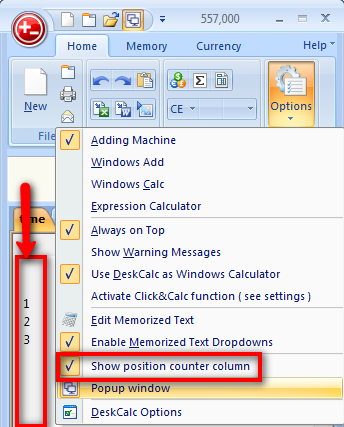
While DeskCalc prints an item counter in the text column of the result of an calculation, it is often very helpful if we can see the actual position while we are typing our calculations. That is the reason, why we added an optional position column to the tape. You may enable this column with the "Show position counter column" as shown in the picture to the right.
This position counter is optionaly also available for printing, but this will be part of the "printing" blog post, that will follow pretty soon.
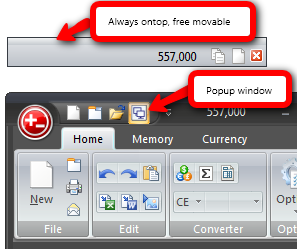
DeskCalc has at least three different ways of showing the actual calculation result, two are know from V4.x these are 1) and 2) but the 3) option is new to V5.x
1) Set the always on top featur, see the options icon
2) Press CTRL + SPACE and you'll get a small window on the upper corner of the screen. While this is great, becausey ou can even calculate with this small window, without showing the main DeskCalc window, it is not free moveable and relatively large.
3) This is the small popup window shown in the picture on the right. It is free moveable, shows the actual result and has three additional buttons. From left to right these are: Copy to clipboard, Show Deskcalc and "Close popup" window.
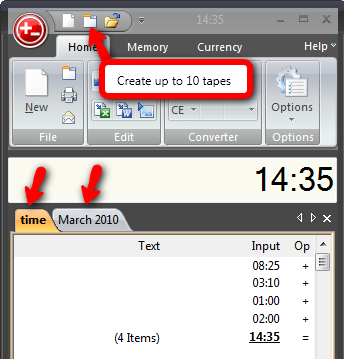
Have you ever wished to do two calculations at the same time with your conventional adding machine? I suppose that has happened more than once, maybe all the time.
You can use auxiliary tapes to organize, and work simultaneously with, several separate but related calculations.
With DeskCalc these days are gone. You can create up to 10 tapes at the same time. An auxiliary tape has all of the same capabilities as the main tape. Press the TAB key to switch from one to the other, or SHIFT+TAB for to opposite direction.
Today I found an interesting article that compares mechanical adding machine with software calculators. I definitly recommend it for all of you adding machine users, who are not sure if a software calculator is the way to go, especially in finanical terms.
" Conclusion:
In my opinion, mechanical paper tape adding machines are a costly, outdated addiction. Migrating the adding machine functionality to electronic adding machine software, like DeskCalc, makes excellent business sense both from cost and environmental perspectives. I think it's time the mechanical paper tape dinosaurs faded into the same sunset where pencil and paper spreadsheets disappeared almost 30 years ago."
{source}<iframe src="https://docs.google.com/spreadsheets/d/e/2PACX-1vSJM6bHVkPaKw3MHYRGJY5P6VYubUDjsUHVz4TRkTBMq9NdymWoSU0LN4OObegllcYzwRV18K9IxWZI/pubhtml?widget=true&headers=true" width="1400" height="700"></iframe>{/source}
Read more: Tape Adding Machines, a Very Expensive, Unnecessary Addiction?
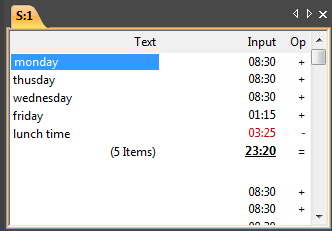
The text-field is a column within the tape (not in the formula mode). To each individual computation position a describing text can be added. The fast detection of corresponding texts can be done with [ F2]-Key activated in the text registration mode, and that text is selected and closed with ENTER. Subsequently, the detection of the next value, results etc. takes place.